

2. Introduction to network computing
1. OSI model network - 2. Model TCP/IP - 3. Types of connected computers - 4. Types of servers - 5. Characteristic of a network - 6. Safety and administration
Before talking of network infrastructures, let's take a few theoretical basics about computer networks in general. A networks able to share resources between computers: data or peripheral (printer, Internet connection, tape backup, scanner,...). As this course is typically hardware, I only see that the hardware aspect. The other parts of a network are included in other courses, including 'Bases networks', "Introduction to LINUX and; UNIX systems", "Software systems",...
Information transfers between two computer on 2 different network equipment is based on two theoretical models: the OSI model or TCP/IP model. These two models are more theoretical and practical. Each includes multiple layers and each layer must send (receive to the other computer) a comprehensible message by both parties. Next chapter (transmission network bases) will address in detail of the communication.
1. OSI model (Open System Interconnection Model)
OSI Model (Open System Interconnection) defined in 1977 regulates the communication between 2 computer systems according to 7 levels. At each level, the communication between the two systems must be "compatible". In network hardware, we use only the lower layers to level 3. These levels are also called layers.
The OSI model defines 7 different levels for data transports. These levels are also called layers.
|
Application |
ß |
Application level | 7 | Application level | Ý | |
| ß | Presentation level | 6 | Presentation level | Ý | ||
| ß | Session level | 5 | Session level | Ý | ||
|
Data transmission |
ß | level Transport | 4 | level Transport | Ý | |
| ß | level Network | 3 | level Network | Ý | Package |
|
| ß | level data link | 2 | level data link | Ý | Trame |
|
| Þ | Physical Layer | 1 | Physical Layer | Þ | ||
|
Support of communication |
||||||
- Level 7 (application): manages the data between software format.
- Level 6 (presentation): updates the data in the form, the encryption and compression, for example formatting texts, pictures and video.
- Level 5 (session): manages the establishment, the management and coordination of communications
- Level 4 (transport): deals with the management of errors, including UDP and TCP/IP
- Level 3 (network): selects transportation routes (routing) and deals with the treatment and transfer of messages: for example manages the IP protocols (address and subnet mask) and ICMP. Used by routers and managed switches.
- Level 2 (data link): uses the MAC addresses. The Ethernet message at this level is the trame, it consists of a header and information. The header includes the MAC address of departure, of arrival + an indication of higher Protocol.
- Level 1 (physical): manages the hardware connections and transmission, defines how the data is converted into digital signals: it may be a coaxial cable pairs on RJ45, radio wave, optical fiber,...
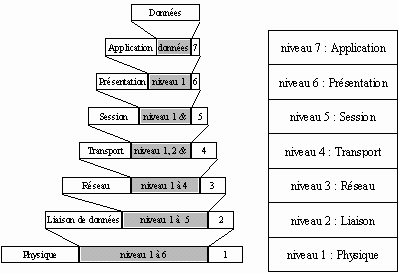 At each of these levels of the OSI model, it encapsulates a header and an end of frame (message) that contains the necessary information according to the rules defined by the employee network protocol. The Protocol is the language of communication (formatting) used for the transfer of data (currently TCP/IP but others were used as (prior to Windows 98) NetBeui, Novell IPX,...). In the graph below, the part that is added to each layer is on a white background. The shaded part is obtained after encapsulation (integration) of the previous level. The last frame that is obtained after having wrapped the physical layer, is one that will be sent over the
network.
At each of these levels of the OSI model, it encapsulates a header and an end of frame (message) that contains the necessary information according to the rules defined by the employee network protocol. The Protocol is the language of communication (formatting) used for the transfer of data (currently TCP/IP but others were used as (prior to Windows 98) NetBeui, Novell IPX,...). In the graph below, the part that is added to each layer is on a white background. The shaded part is obtained after encapsulation (integration) of the previous level. The last frame that is obtained after having wrapped the physical layer, is one that will be sent over the
network.
In this course, only the first three levels of the OSI model (up to top of the range switch and routers) are used, possibly up to level 4 for certain managed switches and firewall. The upper layers are reserved for other courses of technician training PC / network, including basic network and TCP/IP protocol.
2. Model TCP/IP
The TCP/IP model is inspired by the OSI model: it takes modular approach but reduced the number to four. The three layers of the OSI model are often used by an application. This is not the case of the TCP/IP model. It is currently the most used theoretical model.
Protocols used |
Model TCP/IP |
OSI model |
|
level application |
level application |
|
level Presentation |
||
level session |
||
TCP/UDP |
level Transport |
level transport |
IP / ARP / ICMP / RARP / IGMP |
level Internet (IP) |
level network |
Access network sleep |
level Data link |
|
Physical Layer |
Again, is added to each level a header, the names of the data packets change each time:
- The data package is called message at application layer
- Message is then encapsulated as a segment in the transport layer. The message is therefore divided into piece before sending to meet a maximum size depending on the MTU (Maximum Transmission Unit).
- The segment once encapsulated in the Internet layer takes the name of datagram
- Finally, we talk about trame sent over the network in the network access layer
The layers of the TCP/IP model are more general than those of the OSI model
2.1. Application layer
Application Layer includes the standards applications of the network:
- Smtp: "Simple Mall protocol Transport" and ETRN (Extension Turn), mails management.
- Telnet: protocol allowing to connect itself on a distant machine (server) as a user
- Ftp: "File Protocol Transfer", transfer and exchange files via Internet
and some others less current.
2.2. Transport layer
The transport layer allows the transfer of data and controls that allow to check the State of the transmission.
The following layers protocols to send data from the application layer. It does not actually define software that communicate, but port numbers associated with the type of application (number ranging from 0 to 65535 - 216). For example, Internet browsing uses TCP port 80, the https-443, FTP uses 21...
The transport layer handles 2 protocols of transport of information, regardless of the type of network being used:
- TCP is connection-oriented (it checks the good transmission of data by means of signals of ACK - acknowledge - the recipient), it ensures control of the data
- Archaic and non oriented connection, UDP ensures no data transmission control, for example used in streaming.
These two types (connection-oriented or not) are a term used for the firewall. If you close a TCP port, sending a message returns no signal back (acknowledge), believing that the IP is free, not in use. UDP on the other hand, a port closed returns no information, believing a used IP address. The UDP protocol only returns a message if the port is in error (not responding).
2.3. Internet layer
The INTERNET layer is responsible for providing the data packet. It defines the datagrams and manages the fragmentation - reconstruction of the segments.
The Internet layer uses 5 protocols, only the first 3 are important:
- IP Protocol: manages the destinations of messages, the recipient's address
- ARP (Address Resolution Protocol) Protocol: manages the addresses of network cards and correspondence with the IP address. Each card has its own identification encoded on 48-bit MAC address.
- ICMP (Internet Control Message Protocol) protocol manages the information for transmission errors. ICMP does them not correct, he noted only that the message contains errors, used for example by the DOS command Ping.
- The Reverse Address Resolution Protocol (RARP) protocol manages the IP address for the networking equipment that can retrieve one automatically by reading information in a configuration file or via a DHCP server. When a network equipment starts, Manager network bed IP address to use, which is impossible for certain equipment that have no hard drives (mainly terminals)
- The IGMP (Internet Group Management Protocol) Protocol to send the same message to computers that are part of a group. It also allows these machines to subscribe and unsubscribe from a group. The main HARDWARE using of IGMP is found in the managed SWITCH. This protocol allows to group stations.
2.4. Access network layer
The layer Access network specifies the form in which the data must be transmitted. It deals with the following concepts:
- type of networks (Ethernet, Token Ring,...), including network cards
- Data transfer
- Transmission of data synchronization
- Formatting data
- Analog-to-digital conversion for telephone modems
- Checking for errors
3. Types of connected computers and networks
A network makes it possible to connect computers between-them whatever the type (PC, Mac, Main Frames, ...) to share resources.
Two types of computers connected on the network are used: servers and stations (clients). The servers share their resources (files, storage, printer, ...). The clients use these shared resources.
One distinguishes three types of networks:
- "Peer to Peer" or points at points (P2P). Each computer is both client and server. It is the method of the simpler sharing for standard Windows versions (sharing in Workgroup) this term is also used by extension for music sharing and miscellaneous files between computers via the INTERNET.
- Heavy networks use one (or more) central computer (called a server). The access rights of users connecting from client computers to secure data. Different devices still increase this safety (backup tapes, UPS,...). Manager operating system (a dedicated OS) can be Linux, Windows NT Server, Windows Server 2000-2003-2008-2012 or Novell Netware.
- World Area Network (Wan) are international networks to interconnect networks and servers between them. The Internet is a network of this type.
The costs and difficulties of implementation, security and management are proportional. We see that the facilities, Peer To Peer, server considerations or Wan are determined by the operating system and use, not by the network hardware.
4. Types of servers.
In the preceding chapter, we talked about servers in the broad sense. In IT, there are three types of servers:
- File server saves and distributes documents and files shared by users. Configurations are generally not very heavy.
- Application server allows to use a program on a server from all the client workstations simultaneously, mainly applications that use databases (management of manufacturing, commercial, accounting, stock,...). These applications must be programmed to manage the shares. The configuration of these servers are generally larger (for example from the multi-processor). In all cases, a file is not saved during a backup if a user accesses it.
- Print server, printer sharing. Currently, different models are directly connected to an Ethernet network, specific enclosures are also marketed.
In practice, a server often contains three applications.
5. Characteristic of a network.
Local networks are complex infrastructures, not just the cables between workstations. If one enumerates the list of the components of a local area network, we will be surprised to find a larger than expected amount:
- The wiring is the physical infrastructure, with the choice between telephone pairs, coaxial cable or optical fiber. It determines the type of hubs (switch, HUB, Wifi access point, ...) used. These devices are nodes in the case of star networks topologies.
- The access method describes how the network arbitrator communications from different stations on the cable: order, time, organization of messages. It closely depends on the topology and therefore the spatial organization of stations with each other. The access method is mainly materialized in interfaces cards, which connect the station to the cable.
- Protocols are software that "turn" at the same time on different stations and their network interfaces cards. It is the language of communication. So two structures connected to the network, they must "speak" the same protocol.
- Operating system of the server network, often called the network manager is installed on the server. He manages shares, rights of access... These are specific versions.
- The backup system is an indispensable element that works in various ways by systematically copying all the files from the server, either by making regular, possibly automated backups.
- A bridge, router, or gateway are the means of communication that allow one of its users to "exit" from the local network to reach other LANs or remote servers, Internet or other...
- The management and administration of the network system sends the alarms in the event of incidents, captures traffic, remembers the network activity and helps the supervisor to predict the evolution of its network. This part is typically software.
6. Security and administration.
One of the important aspect of a local computer network is the centralization of the data administration. This allows to backup and secure the data on a single machine. Safety takes a set of measures against intrusions and viruses, the management of privileges and access rights, the daily backup of data, redundant equipment failure... There are no ideal solutions for the security of networks (and computer security in General). Three solutions are possible: hardware-based solutions as we will see, solutions based on Linux and Windows-based solutions or programs added on to these Windows workstations. The mix of several solutions is possible in some cases. Some solutions are complementary. On a big "sensitive" network, put a hardware VPN is not enough. A complementary software security including access controls to the administration server (server, folder, access rights) level and software safety checking traffic on the internal network is not superfluous.
- Routers can be replaced by a solution based on a windows Server 2003 or higher, a proxy software such as WinGate or a computer configured specifically for Linux
- A proxy server is sometimes integrated in routers (but generaly under Windows or Linux).
- The firewall are integrated into some routers but software (almost) provide equivalent functions, often integrated into the anti-virus (ex.: Symantec, ZoneAlarm, Mcafee upgraded stations)
- Integrated private networks (VPN) are integrated into some server operating systems but can also be specific equipment.
- Anti-virus are most often software, but can be implemented in routers that verify any of the traffic outside.
Depending on applications, desired level of security, number of computers,... and budgets, the design of the network will use a hardware or software solution or a combination of these solutions. Other management networks (software) programs to manage traffic, users... Clearly, by hardware, you can block complete access to a server, by software, allow only a part of the resources of a server. Access rights solutions often integrate the two.
In relation:
- Dedicated Microprocessors for servers Processors used in severs computers, hardware course
- Networks command in DOS Processors used in severs computers, hardware course
