|
The course HARDWARE 2: Servers, networks and communication |

|

| YBET | Hardware training |
7. The specific hardware for network servers.
1. External specificities - 2. Internal specificities - 3. Basic configuration of a server - 4. Memories servers - 5. Internal ports - 6. Processors - 7. The techniques multiprocessors
The use of a local heavy computer network type Windows 2000 / 2003 / 2008 / 2012, Linux, or Novell Netware requires the use of one or more computer (s) central (to the) called network server. They can be of all types, including mainframe. We see here that the compatible PC X 86 servers based on Opteron, Xeon or Itanium processors. Even if a computer server may be a standard computer (a small network) and a server can be used as high-end desktop PC, these servers are in majority of specific computers incorporating various specificities related to the speed, safety data and installed applications.
The power must be sufficient for the application. A server must not work more than 10% charge on average, under penalty of slow down users and application. Depending on usage, the number of users, the function of the server (program, file, or printer), the configuration should be chosen accordingly, neither too big (price), nor too small.
With the evolution of computing in the enterprise, the server and installation network becomes paramount, the lesser judgment of the computer immediately causes the shutdown of the company with the consequences that we can imagine. That this judgment is caused by a software problem, hardware to a server or to a hub failure has no importance at the start. The result is the same for the company: production, data loss,... A computer network must not stop. If he has prepared solutions for the majority of the causes of breakdowns, a good maintenance technician must "walk around" in the factory. A judgment, especially if it lasts, will pay cash, as much to minimize times.
1. External specificities
Different external solutions can be used on high-end servers:
- Protection by key for ignition, reset, access to the drive CD and floppy buttons,... to avoid interventions not authorized.
- Use of rack 19', which reduces clutter but also allows cables hidden and fixed paths,... The cables must be clearly labeled.
- Blade architecture: overall map on which are plugged cards containing a complete computer, which reduces clutter.
The outer part is related to the housing and the mechanical fixing and... technicians, administrators networks for the wiring aspect: no cable installation speed in the passages. The computer rooms for servers are generally built with a false floor for the passage of the cables. The anti-fire system used of Halon, a inert gas but toxic to humans, banned in 2004 and replaced by the Inergen, also a gas, made up of 52% nitrogen, 40% argon and 8% of carbon dioxide which gives the same effect but is not toxic.
These rooms are usually under controlled temperature of 18 °. The electrical connection goes through a UPS, power uninterruptible (inverter), which ensures an autonomy in the event of common but also protects against various problems related to the network. The inverter can also turn itself off the server with dedicated software. The largest centers also use large generators outage extended (from 5 minutes usually). Concentrators (hubs, switch,...) can also be protected.
2. Internal specificities
- hard drives fast, if possible multi-session: SCSI and SAS for larger connections S-ATA for the little ones. The majority of servers are sold by wholesalers and manufacturers without disks.
- If '' crash disk '' data security: duplication of the hard drives per RAID systems
- protection in case of failure of power supply or voltage drop: electrical UPS
- data security in the event of complete failure of the server or loss of files (daily backup)
- Hard drives, peripheral cards, power supplies,... connectable / disconnectable "swappable" (hot plug) and redundant in option. This means that the device can be replaced while the PC continues to run.
- Integrated graphics and (generaly not used) audio card
- fast Hard disks to give information as soon as possible after a request of a connected customer, if possible multi-sessions, which implies connections SCSI and SAS. Note, Server computer are sold without disks, you can choose technology and capacities.
- data security in the event of "" (breakdown supplements of a hard disk): unfolding of the discs by systems RAID
- data security in the event of breakdown of power supply or fall of tension: UPS
- data security in the event of breakdown supplements of a computer (daily safeguard)
Hard drives are usually SCSI or SAS (possibly S - ATA). No better in stations that E-IDE hard disks, except in times of access, SCSI and SAS connections are more efficient in multi-read (multiple concurrent requests). They can also be redundant (RAID 1): the data is written to multiple disks at the same time, the reading is done only on a single. In the event of crash, continues on the other disks. In the event of a server complete crash, can couple permanently 2 servers in the same way. All these systems are called RAID.
Opposite, the Interior of an old model Compaq Pentium 1-based, daughter card containing the processor, memory and chipset. It connects via a specific bus on the motherboard which contains a SCSI controller.
For power supplies, you can use 2 redundant power supplies (doubled). Each can feed all in an autonomous way. For internal cards, PCI - X 64 allows to remove or to insert a card without cutting the machine (hot) with a compatible operating system (in practice, all managers networks, for example Windows 2003). Duplication of a computer installation guarantees the continuity of the installation in the event of failure of a component, it is called computer redundancy.
At the level of the devices, backup tapes are still often used with transfer speeds of SCSI-based. Other solutions like NAS are also used.
3. Basic configuration of a server.
Before returning in purely technical solutions, let us see a little the use of a network server. By definition, a server is not a workstation. Result, the graphics board, the CD-Rom reader are not paramount components. The monitor should not either be a multi-media model of high range. The screen of the server is generally one 15"(even one 14 black and white) which turns" in neutral ". One is interested in posting only in the critical cases. The CD-Rom reader is generally not either of type SCSI but well E-IDE (SATA), considering his weak use. According to the operating system, one can (or one must) configure it via a station.
Ram memory must when it to be sufficient, the discs of double capacities, even triple compared to the maximum capacity which you will use on this machine. I speak here about the capacity effective, usable, without returning in technology RAID
4. Memory server.
First comparisons with the traditional memories, the memories used by servers are the same uses by traditional PC. The current servers use memories ECC (Error Checking and Correcting or Error Correction Codes). This technology uses several bits of control (parity) for the checking of the data in memory. These memories are car-corrective. This memory can detect 4 errors and correct one without stopping of them the system. A new type of memories with correction of error AECC (Advanced Error Correcting Codes) can detect 4 errors and correct 4 without stopping of them the system.
5. Internal bus.
In office PC, the current ports are PCI 32 bits or PCI-Express (AGP for older). These ports have two problems.
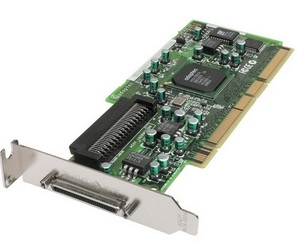 The first, they are not hot
plug. Board replacement requires to stop the server. In the small
servers, this does not pose problems in practices. Indeed,
as each function is carried out by only one chart, the server does not ensure in
any event plus its function in the event of breakdown of chart. On the other
hand, in the servers of high range, all the charts are redundant.
A board network is duplicated. In the event of breakdown of a chart, the
function continues on the second equivalent chart. This makes it possible
"to repair the server" without stopping it.
The first, they are not hot
plug. Board replacement requires to stop the server. In the small
servers, this does not pose problems in practices. Indeed,
as each function is carried out by only one chart, the server does not ensure in
any event plus its function in the event of breakdown of chart. On the other
hand, in the servers of high range, all the charts are redundant.
A board network is duplicated. In the event of breakdown of a chart, the
function continues on the second equivalent chart. This makes it possible
"to repair the server" without stopping it.
Second limitation, the rate of maximum transfer on a PCI bus is limited to 132 MB/s across the connectors. Take a NIC Giga Ethernet (1000 Gb/s). Divide by 10, an average value for the transfer rate in bytes, it already gives 100 MB/s nothing that for a single card. The hard drives on the same port connection is finally impossible, a SCSI 160 goes to him alone use... 160 MB/s, which is higher that the bus can transfer. This bus is used for cards networks fiber optic (2 channels for the bidirectional), Giga Ethernet over copper (up to 4 channels on the same card), and version SCSI 160-320.
Developed jointly by the leading manufacturers of network (IBM, Compac, HP and Intel) servers, these computers use PCI-X bus on 32 or 64 bits. It is an evolution of the standard PCI but with clock speeds ranging from 66 to 533 Mhz versions 32 or 64-bit (33 Mhz 32 bit for the standard version).
The PCI - X 1.0 version (1999) developed in 6 versions.
Bus Frequency PCI-X 1.0 |
Voltage |
Data Bus with |
Band Width |
| 66 Mhz | 3,3 V | 32 bits | 264 MB/s |
| 64 bits | 528 MB/s | ||
| 100 Mhz | 3,3 V | 32 bits | 400 MB/s |
| 64 bits | 800 MB/s | ||
| 133 Mhz | 3,3 V | 32 bits | 532 MB/s |
| 64 bits | 1064 Mb/s |
Version PCX-2.0, left in 2002, is also fed in 1,5 V according to the versions. The boards are hot Plug.
| Bus Frequency PCI-X 2.0 | Voltage | Data Bus with | Band Width |
| 66 Mhz | 3,3 V | 32 bits | 264 MB/s |
| 64 bits | 528 MB/s | ||
| 100 Mhz | 3,3 V | 32 bits | 400 MB/s |
| 64 bits | 800 MB/s | ||
| 133 Mhz | 3,3 V | 32 bits | 532 MB/s |
| 64 bits | 1064 MB/s | ||
| 266 Mhz | 3,3 V / 1,5 V | 32 bits | 1064 MB/s |
| 64 bits | 2128 MB/s | ||
| 533 Mhz | 3,3 V / 1,5 V | 32 bits | 2128 MB/s |
| 64 bits | 4256 MB/s |
32-Bit PCI - X cards can be inserted into a 64-bit (not necessarily the opposite) bus. The PCI - X bus are directly connected on the Northbridge of chipset, which requires motherboards (chipset) specific.
Ports PCI - X range up to 533 MHz. This gives us a transfer rate of 533 * 8 (64-bit) = 4256 MB/s for the whole bus. Generally, a server accepts also 1 or 2 port PCI 32-bit card standards. With ports PCI - X, we find the expected characteristics: speed and Hot plug (adapter driver permitting). Last accuracy, these boards and the implantation of these bus are expensive and complex. Each server does not automatically include a PCI - X 533 Mhz (the majority did even more built in since the arrival of the PCI-E 2.0). There are 33, 66, 100, and 133 Mhz cards. In addition, big servers do not include one, but 2 or 3 ports PCI - X. Small servers uses PCI-Express as station.
6. Microprocessor server.
For the effective characteristics of the processors dedicated to the servers networks, you can refer in the page microprocessor server. This part takes again only the general cases.
6.1. Introduction
The processor of a server is not office an animal of competition. A server dos not create multi-media-applications. Except for the servers of programs, the processors are generally "weak". A server of Web can at ease be satisfied with I3.
On the other hand, in the heavy applications, the manufacturers of processors moved towards two directions: specialized processors and the multiprocessor. Both are partly dependent.
The current processors are 32 bits. This means that the instructions out of assembler that they read are coded on 32 bits. With the roadhogs of data processing, to increase the performances of a processor, you can either increase speed, or to double the number of instructions per cycle of clock. This solution already used, but the processors 64 bits use this possibility differently. Indeed, like the current processors, the programs are written in 32 bits. A processor 64 bits cannot thus read instructions 32 bits and screw poured. INTEL with its processor 64 bits ITANIUM left in July 2001 circumvented the problem by not taking the old instructions 32 bits (that which we know). This required to rewrite the programs and operating systems or rather recompiler, i.e. to reconvert the program assembler 32 bits in 64 bits. Windows 64 bits exists for these processors, but few programs are really on the market. This reduces Intel Itanium to computer servers or very high range stations. AMD chose the opposite way. While creating a processor 64 bits kept compatibilities 32 bits. The AMD 64 bits thus carry out as much the current applications that the applications 64 bits.
A last thing, the use out of bi-processor and superior requires an operating system adapted. Windows NT, 2000 and XP Pro are sold in manner specific. Novell obliges an additional option. UNIX - Linux is native multiprocessors, if the function is established according to the mother chart/OS. The versions "home" of the operating systems Microsoft (Win95,98 Me and XP Home) do not manage the multiprocessor.
6.2. INTEL
Dedicated processor Intel Server is XEON 32/64 bit. Compared to the Intel Dual-Core or even I7, INTEL generally inserts larger L1 and L2 caches. The socket and chipset are different. The Itanium and Itanium II are full 64-bit and require specific operating systems.
One final note, with the Pentium IV 3.06 Ghz, INTEL now includes hypertreading (not on the Intel Core but reintroduced with the I7). This technique allows to emulate two processors software in a single processor. The benefit is linked to the speed even if different tests are quite mixed, particularly because the application must be dedicated to this process in the case of workstations. On the other hand, this function is widely implemented in ITANIUM and XEON.
The arrival of Dual-core in 2005 and the first Xeon quad-core in November 2006 and even 6 hearts in October 2007 further modify a little the deal, especially as the Xeon directly manage the PCI-E bus (such as the I7).
6.3. AMD
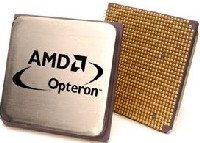 Since September 2001, AMD manufactures of Athlon capable to work in dual (Athlon MP), with a chipset him also specific. The opteron uses the same internal architecture as the Athlon 64, but can connect up to 8 processors
simultaneously.
Since September 2001, AMD manufactures of Athlon capable to work in dual (Athlon MP), with a chipset him also specific. The opteron uses the same internal architecture as the Athlon 64, but can connect up to 8 processors
simultaneously.
The Opteron, released in April 2003, is the server - high-end computer workstation version. The difference compared to the desktop Athlon is related to the number bus hypertransport that these processors are able to manage (1, 2, or 3). The 100 series uses a bus and is not multi-processor. 2 Bus (200 series) versions accept the dual, 3 buses (300 series) versions natively allows up to 4 simultaneous processors, up to 8 with a specific circuit. Current chipsets accept PCI - X, PCI-Express or AGP directly on the northbridge bus (these processors directly manage the memory, without going through the chipset).
First developed with a specific type socket 940 (and registered memories), some versions use the AM2 (such as desktop versions). The multi-processor foreseen for end of 2008 will use a new socket, type F.
7. The multiprocessors techniques.
First distinguish the Dual-core multiprocessor. In the first case, two processors are inserted in the same chipset. In the second case, two different processors (or more) are inserted on the same motherboard. In this case, the processor can also be Dual-core or more. This is the second method that interests us. Work with multiple processors simultaneously (within the same machine) necessarily require a compatible motherboard. The principle should allow to share memory, disk access and generally all buses internal.
Using 2 processors simultaneously is a bit faster compared to a dual-heart (a few %), but the prices are much more expensive.
Two techniques are used: the SMP to switched bus (Symetric multiprocessing) and multi-processing Numa. The difference between the two is reduced with the evolution, manufacturers begin to blend the two.
The SMP is used primarily in a server for a small number of processors, the digital is better suited to a large number of processors.
7.1. SMP, standard UMA (Uniform Memory Access)
Architecture SMP consists in using several processors sharing the same memory and the same internal peripherals. Only one operating system makes turn the sets of the processors. Following several technological projections, the limits of this principle were pushed back. Indeed, to divide does not want to say use at the same time.
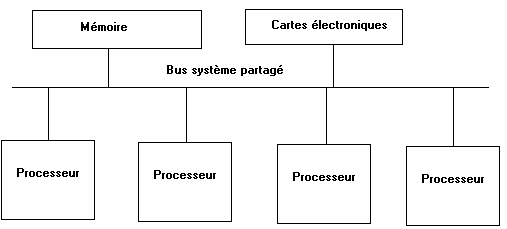
Structure standard SMP (UMA)
The system bus was a long time the weak point of the SMP. Thus, the first multiprocessors made communicate the processors between-them via shared systems buses. Those quickly became saturated beyond some processors. The increase in the memory hiding place and the increase in the work frequency of this bus have made it possible to improve the performances of a server. Nevertheless, the upgrading capabilities of these buses are weak, the band-width remaining in all the cases constant.
To work out evolutionary platforms, the manufacturers of processors worked on architectures with commutated buses. This A made it possible to create infrastructures of interconnection whose band-width could be increased by stages, thanks to additional switches. This type of connection is at the base of modular systems. The elementary components are not any more the processors, but boards girls Bi or quadri processors inserted in connectors on a basic central board. It is Sun which used this technique the first with a machine able to exploit until 64 microprocessors simultaneously. The board accommodating the girl board allows a flow of 12,8 GB/s and makes it possible to plug in until 16 boards four-processors. Each addition of boards four-processor sees the opening of channels of additional interconnection and thus an increase in the band-width. In system SUN, the memory is localized on each board girl. She thus seems held by board. In fact, all the accesses report are made by by the central bus, whether the access is on the same board girl or another. By this principle, technique SUN uses a technique SMP. Each manufacturer currently uses a technique if not identical, at least equivalent. Certain firms have nevertheless to insert a local controller on each board.
7.2. Multi-processing of the type Numa (No Uniform memory access)
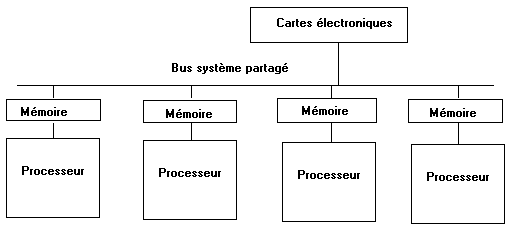
Structure NUMA
Architecture NUMA makes it possible to use more processors. Technology makes it possible to gather groups of processors, using their own local memory, and to connect them between-them by buses able to deliver several giga Octets a second. By no uniform access to the memory, it should be understood here that a processor will not reach within the same times a data in memory if this one formed part of a local or distant memory. This difference in times is reduced nevertheless, thus gathering architectures UMA and NUMA. The memory is by the whole of the processors. This implies that system NUMA exploits a management of coherences of the memory hiding place able to take into account the whole of the processors attached to the platform.
Technology multiprocessor is not based nevertheless solely on the bus management of connection. The communications on the buses of interconnection must also allow to maximize the treatment of the tasks between the processors.
A last remark, and of size, architecture NUMA obliges that each processor makes turn its own operating system, whereas in case SMP, only one operating system turns for the whole of the processors. This thus dedicates NUMA for systems UNIX multiprocessors or owners and SMP for the world of servers INTEL - Windows, even AMD Opteron uses NUMA (Memory controller is included in processor).
In relation:
- Microprocessor PC Microprocessors used in computers PC
- Memory technologies for PC Memories used in the PC
- Hard disk Hard disks IDE and SATA for standard computer
- Dedicated-server microprocessor Specific processors for servers PC
|
Next of Hardware course for network > Chapter 8: Hard disk SAS, SCSI, RAID |

The Hardware 1 course: PC and peripherals, the Hardware 2 course: Network, servers and communication.
© YBET data processing 2006 - 2015