

9. Professionals backup solutions for servers
1. Types of backup tapes - 2. DAT tapes - 3. AIT and SAIT - 4. 8 mm cartridges - 5. DLT - 6. Super DLT - 7. LTO (Ultrinium) tapes - 8. Libraries - 9. REV from IOMEGA - 10. SAN and NAS (Hard disks), iSCSI - 11. Cloud Computing - 12. Backup Strategies
After studying in first year standard backup methods, see methods of backup data of the computer servers. Not used for personal PC, tape drives are the primary method of backup of the computer servers. The technologies allow transfer speeds of up to 540 Mbps (LTO) with capacities exceeding several Tera (1000 GB).
Hard disk in RAID on servers give a semblance of backup, or rather a false sense of security: in case of a crash disk, data can be recovered under some conditions (RAID 1,5,10, ...) but not in the case of data corruptions, erase files accidental (or not),... If the safety data is important on a professional station, the problem is much greater in the case of network servers. First, users have full confidence to the network (and especially its administrator) for data: backups are normally daily on the servers. Second, network applications are often too large to be saved individually (place, access rights and privileges,...).
Users must log out of network when they leave work. If a file is used by an application, it will not be saved by the backup. With RAID 1, we can for example disconnect a users hard drives (even if this possibility is actually available on high-end network servers). A disk is therefore accessible in for users while the second is reserved for the backup. When the backup is complete, 2 Raid disks are resynchronized to resume normal operation.
1. Types of backup tapes.
In the first year hardware course, we have already seen the tapes for workstations. In the case of a station, the choices are many: floppy disks (?), recorders, DVD-Rom, Zip,... and the bands are... little used. On the other hand, tape drives to make backups without user interventions to specific days and hours. This possibility, supplemented by the cost price of a band to the MB, makes it practically inevitable as solution for servers. By coupling bands in "Chargers" called libraries, it still increases the capacity. The connection is always in SCSI or SAS or other external devices, either internal (speeds are identical).
Different technologies of readers are no longer used (obsolete) as the series has and knows and 8 mm. Future developments look rather to applications hosted on Internet, which will still reduce the types used.
2. DAT
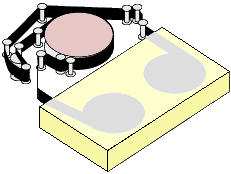 DAT is initially developed to replace analog audio cassettes by a digital audio standard, with CD audio quality. With the standard DDS (Digital Data Storage), Hewlett Packard and Sony builds in computer technology in 1989. DAT uses 4 mm wide tapes. Writing / reading is elliptical (writing is not perpendicular to the band but shifted as for video
cassettes). This method is slower that the model linear but allows to increase data
capacity.
DAT is initially developed to replace analog audio cassettes by a digital audio standard, with CD audio quality. With the standard DDS (Digital Data Storage), Hewlett Packard and Sony builds in computer technology in 1989. DAT uses 4 mm wide tapes. Writing / reading is elliptical (writing is not perpendicular to the band but shifted as for video
cassettes). This method is slower that the model linear but allows to increase data
capacity.
Writing is done by groups of 128 KB, including error correction. During the reading, the band retrieves the entirety of the Group (correction included) data before you restore the data on the hard disk.
In DAT, two registration methods are used, the DDS (most common) and the DataDAT (obsolete and rather reserved multimedia). The mechanism of the drives is identical but not the data's encoding. The two are incompatibles.
| Standard | Capacity (uncompressed / compressed) | Rate of transfer max. | Date |
| DDS-1 | 2 / 4 GB | 0.55 / 1.1 MB/s | 1989 |
| DDS-2 | 4 / 8 GB | 1993 | |
| DDS-3 | 12 / 24 GB | 1.1 /2.2 MB/s | 1996 |
| DDS-4 | 20 / 40 GB | 1.1 / 2.2 MB/s | 1999 |
| DDS-5 | 36 / 72 GB | 1.5 / 3 MB/s | 2003 |
| DDS-6 | 80 / 160 GB | 3.5 / 6.9 MB/s | 2007 |
| DDS320 | 160 / 320 GB | End of 2009 |
DDS5 (also called DAT72) can use the DDS-3 and DDS-4 tapes. The latest technologies are mainly developed by Hewlett Packard.
3. AIT and SAIT
Developed by Sony since 1996, AIT tape drives have capacities from 35, 50, 100, 100, 200 GB or 400 GB uncompressed mode. For the small model, it competes directly with the (slower) DAT or the DLT. In 2008, Sony has stopped all developments in these two technology to devote himself to the DAT in cooperation with HP.
These backup devices can be interfaced in USB, Firewire and SCSI versions for external models, Serial ATA, parallel ATA, SCSI for internal models.
Six models are developed following the backup capacity and transfer speed. Each model can be supplied in standard mode or in turbo mode (increase the speed of transfer).
These tape drives are recognized by the majority of the software for back-up on the market. AIT has a backward compatibility. Everyone can read use (read / write) the smaller models. Starting with version 4, they are compatible with the WORM method (Write Only / read Many) which allows a single writing, used in the preservation of official documents in industry.
Technology SAIT has with a larger capacity, but does not use AIT bands. Except for SAIT and SAIT2 with format off 5"25, all this devices was in 3"5.
Capacity: uncompressed / compressed (*) |
Interface |
Transfer |
tapes type |
|
35 / 90 GB |
Ultra-Wide SCSI |
4 MB /s - 10 in compressed |
8 mm |
|
50 / 130 GB |
Ultra-Wide SCSI |
6 MB/S - 12 in compressed |
8 mm |
|
AIT-3 |
100 / 260 GB |
SCSI 160 |
12 MB/S - 31 compressed |
8 mm |
AIT-3 EX |
100 / 390 GB |
SCSI 160 |
18 MB/s - 46 compressed |
8 mm |
AIT 4 |
200 / 520 GB |
SCSI 160 |
24 MB/s - 62 compressed |
8 mm |
AIT 5 |
400 / 1024 GB |
SCSI 160 |
8 mm |
|
| 1 | 500 GB / 1.3 TB |
SCSI 320 |
30 MB /s - 78 in compressed |
1/2 AME |
SAIT2 - 800 |
800 GB / 2 TB |
SCSI 320 |
45 MB /s - 117 in compressed |
(*) compression used by Sony is 2, 6:1, other manufacturers usually announce a more realistic 2:1 compression rate
 4. Cartridges 8
mm.
4. Cartridges 8
mm.
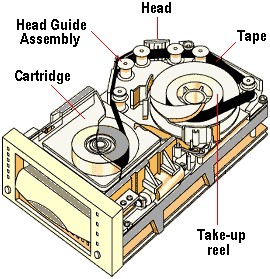
8 Mm cartridges have been developed initially for videos: transferring images in high quality color on tape for backup. Similar to the DAT, but larger capacity generally, the 8mm also uses helical technology.
Two standards are used depending on the compression system: Exabyte Corporation and its standard 8 mm and the mammoth developed by Exabyte and Sony. These models are no more delivered (2007). All this devices was interfaced in SCSI.
| Standard | Capacity (not compressed / compressed) | Rate of transfer max. |
| Standard 8 mm | 3.5 / 7 GB | 32 MB /min. |
| Standard 8 mm | 5 / 10 GB | 60 MB /min. |
| Standard 8 mm | 7 / 10 GB | 60 MB /min. |
| Standard 8 mm | 7 / 10 GB | 120 MB /min. |
| Mammoth | 10 / 28 GB | 360 MB /min. |
| Mammoth LT | 20 / 40 GB | 360 MB / min. |
| Mammoth - 2 | 50 / 100 GB | 1.8 GB / min. |
5. DLT
 Developed in the 1980s by DEC (Digital, bought by Compaq) for his microcomputers VAX, DLT technology
appeared in 1989. This technology was acquired in 1994 by Quantum. Other manufacturers use this technology to OEM.
Developed in the 1980s by DEC (Digital, bought by Compaq) for his microcomputers VAX, DLT technology
appeared in 1989. This technology was acquired in 1994 by Quantum. Other manufacturers use this technology to OEM.
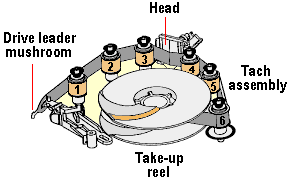
DLT drives use a smaller than 8 mm tape cartridge. The band is split into parallel tracks on the entire length. Each entry uses two tracks (data and correction). When the end of the track is encountered (end of the Strip), heads are repositioned on a new pair of tracks and the backup continues by returning from the back) until the band is complete (per round - trip). The current bands include 128 or 208 tracks.
DLT technology is unique in the implantation of the heads. Six guides implantation ensures a helical band course (in the same way as the technologies above), ensuring excellent contact tape / head. This is associated with 2 guides that make the cleaning of the band and are not powered. This ensures a lifetime of 30,000 heads hours for 2000 in the case of the DAT.
Standard |
Capacity in GB (compressed) |
Media |
Interface |
Transfer rate maximum compressed |
| DLT 2000 | 10 (30) | SCSI | 2,5 MB /s | |
| DLT 4000 | 20 (40) | 3 MB /s | ||
| DLT 7000 | 35 (70) | 20 MB /s | ||
| DLT-4 (VS-80) | 40 (80) | DLT tape IV | Wide Ultra SCSI-2 | 6 MB/s |
| DLT-4 (VS-160) | 80 (160) | DLT tape VS1 | SCSI | 16 MB/s |
| DLT-V4 | 160 (320) | DLT tape VS1 | SCSI | 20 MB /s |
| DLT-S4 | 800 (1,600) | DLT-S4 | Ultra-SCSI 320 | 120 MB/s |
Only V4 and S4 equipments is still produced.
6. Super DLT
Super DLT tapes are also provided by Quantum, other manufacturer produce them under license. These bands increase the ability of the DLT tapes. In this case, the read/write heads are controlled with laser (technology LGMR - Laser Guided Magnetic Recording). Read, these bands of backups generally accept lower media. S-DLT 600 is WORM compatible.
| SLDT 220 | SLDT 320 | SLDT 600 | |
| Basic capacity | 110 GB | 160 GB | 300 GB |
| Compressed capacity
(2:1 of compression) |
220 GB | 320 GB | 600 GB |
| Rate of transfer (DTR) | 11 MB /s | 16 MB /s | 32 MB/s |
| Compressed DTR | 22 MB /s | 32 MB /s | 72 MB /s |
| MEDIA | SDLT I | SDLT I | SDLT II |
| INTERFACE | ULTRA2 SCSI LVD
HVD |
Ultra2 SCSI
Ultra 160 SCSI |
Ultra 320 SCSI
Optical fibre |
| DATE | TR1 2001 | TR1 2002 | TR3 2003 |
7. LTO (Linear Tape Open) Ultrium
 LTO technology was developed jointly by IBM, HP and Quantum. Implementation of this standard is called Ultrium. Different standards are managed by a grouping, the LTO-Technology that deals with the standardization and grants it
licenses. Six generation are developed, even if the 5 and 6 are more to the State of ongoing standardization
project.
LTO technology was developed jointly by IBM, HP and Quantum. Implementation of this standard is called Ultrium. Different standards are managed by a grouping, the LTO-Technology that deals with the standardization and grants it
licenses. Six generation are developed, even if the 5 and 6 are more to the State of ongoing standardization
project.
It is currently the most efficient backup technology, both in capacity and transfer rate.
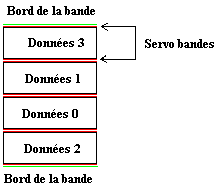
The band is divided into 4 area throughout its length, numbered from 0 to 3. Each track is surrounded by two bands servo zones to align the head, including in the event of slight wear of the band. Writing first uses the track 0 on the entire band. Once arrived at the end, she resumed in reverse on track 1, and so on.
LTO-1 |
LTO-2 |
LTO-3 |
LTO-4 |
LTO-5 |
LTO-6 |
|
Capacity not compressed (compressed 2:1) |
100 GB (200) |
200 GB (400) |
400 GB (800) |
800 GB (1.6 TB) |
1.5 TB (3 TB) |
4 TB (8 TB) |
Transfer rate: uncompressed / compressed |
20 MB/s (40) |
40 MB/s (80) |
80 MB/s (160) |
120 MB/s (240) |
100 MB/s (280) |
160 MB/s |
Year |
1998 |
2002 |
2004 |
2007 |
2010 |
2012 |
8. Libraries
The libraries are groupings of tape that allow using multiple bands simultaneously in an external charger. If they can be used as a standard solution, the main use is to keep data that are not too (or infrequently) used but must remain accessible to users. Files are recognized as a hard disk, but are physically recorded on tapes. On request, the file is returned to the hard disk. Auto archiving program periodically transfers all files that are no longer used since a certain (generally, auto archiving is done every day).
9. REV from IOMEGA
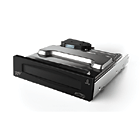 Intended to compete with backup DAT and replacing the Jazz players, the Iomega REV has many advantages. The REV drive uses Removable 35 GB cartridges (90 B compressed), the capacity of the largest drives DAT. Internal, they are interfaced in IDE, SATA, SCSI. In all cases, the transfer speed is up to 25 MB / second.
REV are also available with external (interface SCSI, Firewire (Mac) or USB). The associated backup software allow quite identical to the backup
tape.
Intended to compete with backup DAT and replacing the Jazz players, the Iomega REV has many advantages. The REV drive uses Removable 35 GB cartridges (90 B compressed), the capacity of the largest drives DAT. Internal, they are interfaced in IDE, SATA, SCSI. In all cases, the transfer speed is up to 25 MB / second.
REV are also available with external (interface SCSI, Firewire (Mac) or USB). The associated backup software allow quite identical to the backup
tape.
The big advantage comes from the price of the device, in a €400 for nearly double for a DAT drive, same if interfaced with SCSI 160, they are theoretically faster. It is the ideal present for the backup of small file servers, even if the price of cartridges (about €50) are more expensive that the price of a simple band DAT. As the SATA and IDE are established as standard in common PC, this solution can also be used in workstations.
This reader are obsolete.
10. San and NAS
Storing files on the disk hard a server does finally to the distribution of files but implies rather expensive Windows users licenses. The following solutions will cancel these licenses.
10.1. NAS (Network Attached Storage).
 A
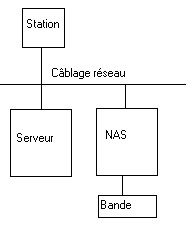
NAS is made up of one or more disk (hard (s) Sata, PATA or SCSI more rarely (RAID or not), an Ethernet connection, a microcontroller and Linux (no user licenses) operating system. The administration is done directly via a Web interface and is reduced to the rights of access of users, setting up TCP/IP for the network adapter, possibly the DHCP server. Strong point of such equipment, the facility on the road price (no Windows
license).
A
NAS is made up of one or more disk (hard (s) Sata, PATA or SCSI more rarely (RAID or not), an Ethernet connection, a microcontroller and Linux (no user licenses) operating system. The administration is done directly via a Web interface and is reduced to the rights of access of users, setting up TCP/IP for the network adapter, possibly the DHCP server. Strong point of such equipment, the facility on the road price (no Windows
license).
As an option for high-end appliances, (swappable hot) Hot-Plug hard drives, RAID, synchronization of access rights with privileges users on the Windows Server,...
10.2. SAN (Storage attached Network).
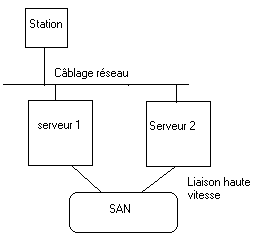 If a NAS is attached directly to the network, the SAN is positioned as memory of extra mass to one or more servers. In this configuration, disk and tape libraries are directly connected to these servers by a fiber optic connection. Normally, all tape libraries and drives are visible to all processors. The Zoning feature to isolate sets of drives and libraries from other sets. The discs are therefore accessible from multiple servers
simultaneously.
If a NAS is attached directly to the network, the SAN is positioned as memory of extra mass to one or more servers. In this configuration, disk and tape libraries are directly connected to these servers by a fiber optic connection. Normally, all tape libraries and drives are visible to all processors. The Zoning feature to isolate sets of drives and libraries from other sets. The discs are therefore accessible from multiple servers
simultaneously.
The communication protocol between the server and the SAN uses the fiber Channel, is a communications protocol that allows to send commands to drives SCSI encapsulated in a network protocol. This method allows fast transfers. Yet, the difficulty to put in place this type of storage the reserve only to large companies.
The difference between a NAS and SAN is just at the level of the direct access via a NAS network through servers (including privileges users for a SAN).
10.3. ISCSI
SAN based on Fiber Channel implementation is complex and demands specific skills. IBM and Cisco have developed a different approach to storage network using TCP/IP as a network protocol and encapsulating SCSI top commands. This method is standardized since 2004. The advantage is mainly related to costs, already the implementation but also the use of SATA drives cheaper than the SCSI.
These storage arrays simply connect on the network of the company as a simple NAS in case the simple (but not recommended)) or through a separate Ethernet network. As a NAS, ISCSI allows you to store simple documents but also enables the data sharing (SQL, Exchange,...) database, always allowing the sharing between different servers. It is therefore a mixture of NAS and SAN.
The majority of manufacturers use Windows Storage Server of Microsoft, a particular version of Windows server 2003 as a NAS Manager. At the level of the servers, Windows 2003 (not SBS version) and 2008 directly integrate the driver (iSCSI Software Target), to install administration tools if this is not done by default, it is also available under Linux
.If specific network ISCSI adapters are developed, the current Giga Ethernet cards on servers are all compatible TOE (TCP/IP Offload Engine). What is the TOE? A standard network card does that check the checksum and reassemble data, is the processor that makes everything else work. A map TOS will also retrieve the information of the network TCP and IP Protocol (i.e. up to level 4 of the OSI model). This significantly reduces the load on the processor who receives more than data.
11 Cloud computing
Cloud computing brings together everything and nothing (even a marketing idea): automatic data backup, sharing documents through applications (dedicated programs). The only real point is that everything is hosted on the Internet, allowing access to distance from finally anywhere. All of these solutions through a subscription.
11.1 AutoSave.
Developed since the beginning of the 2000s, this technique uses a software on the computer to be protected which will simply copy the data on an Internet site with encryption (in real time or at a specific time). This is the same principle as the software provided with external hard drives except that the data is not in the building but both external. As all Internet transfers, backup (sending) is rather slow but rather rapid recovery. This solution does not allow sharing of documents (this is not its purpose).
11.2. Sharing documents.
Second solution adopted by many companies, implementing online secure documents with access. This cloud system is finally a file hosted on the Internet server. The first advantage is that the company no longer has to make its own backups, these solutions copy data on several Internet servers. The second is finally remote access and sharing with absolutely identical to those access rights for internal network servers.
11.3 Distributed applications.
This solution is somewhat identical to sharing documents because it also includes the backup but resumed in addition to desktop applications, calendars, mail software... Two big players are currently on the market:
- Google Docs includes a word processor, spreadsheet, presentation, drawing... All these solutions are collaborative, documents can be modified simultaneously by multiple users. Use is free but the backup space is limited without a subscription.
- Microsoft and Office 365 (also 2012) is simply the passage of the Office suite directly accessible on the Internet. The standard suite 2010 is retained. This solution requires a subscription by users for all versions.
11.4 Applications remotely.
This solution is different since this time an application runs directly on an Internet Server with remote access. The advantage is mainly related to the load in the event of strong demand for computing power, multiple servers can be used in real time (this is the solution proposed by Amazon). The alternative, proposed for example by Microsoft Azure (2012) is server virtualization that allows to run multiple operating systems at the same time (same as a local but hosted virtual server remotely).
Which applications can use this method? Almost all both transfers are not too important to the users PC. Almost all of the databases in client mode / server can be used, including management applications. This is probably the future of computing in the medium term.
12. Strategy of backup.
Whatever examples to show the importance of a daily safeguard.
- Virus or intrusion by Internet (hacker)
- modification of the configuration software directly on the server (method largely used in practice) to add functionalities and... faulty operation. In practice, oblige the programmers to make a complete copy of the file on the hard disk. It is faster in the event of problem and will avoid you hours of recovery on tape.
- accidental or different obliteration of files, losses of files in the contents of the disc.
In these three cases, the discs in RAID are not useful to you with nothing.
12.1. In first course, we had seen the three types of safeguard:
Complete backup : save the whole of the files of the hard disk. This backup is very sure, but long.
Incremental backup: safeguard only the files which were modified since the last safeguard. A restoration thus requires to recover a complete safeguard initially and then to take again the incremental restorations.
Differential backup : copy all the files since the last backup complete or incremental. Indeed, this mode of safeguard does not modify the bit of file of the files.
Each method has its qualities and its defects. It should not be forgotten that the duration of a back up is long, from where the interest not not to save too much. Moreover, one daily complete safeguard would make double function, the programs and the operating system is seldom modified every days.
The complete backup makes it possible to take again the whole of the files of only one block. Nevertheless, in the event of complete loss of a hard disk, it is initially necessary to reinstall the operating system. The duration of a complete backup is very long and obliges to cut the servers of the users. Indeed, in recovery, one replaces the files completely. If a file misses, the program does not function or worse will pose "odd" problems.
An incremental saves the files which are not safeguarded yet. Consequently, these safeguards are fast. But... The recovery of the files of an incremental safeguard obliges to recover some several behind, until a complete safeguard of the file.
A differential saves all the files since the last complete or incremental backup. The time of safeguard is thus very long and increases with each safeguard. As the bit of backup is not notched, one needs another type of front safeguard. If not, the server (or the file) will be completely saved each time
Complete |
incremental |
differential |
|
| SAFE | |||
| modification of the bit of safeguard | YES | YES | NOT |
| duration of the backup | Long | short | long - short |
| disconnected of users | Yes | YES/NOT | NOT YES |
| Defect | problem on a tape | problem on a tape, obligatory tape changing each time | Obligatory change of tape each time, length |
| RESTORATION | |||
| type of recovery | Each backup until the complete last | A backup until the complete last | |
| Risks | missing file | A safe as a whole defective | |
Let us mix the methods with the particular aspect of the use of the data on the server. The strategies below can be complete on the disc or by part (files). Moreover, it can be mixed.
A interesting strategy of backup of the data remains a followed regular complete backup of a backup differential day. Unfortunately, this poses two problems. The first is the periodicity of a complete safeguard. The longer it is, the more the differential backup will take time. And the second is precisely the duration of a differential backup.
A second consists in making a complete backup per month, follow-up of an incremental backup per week and a differential per week. This strategy is flexible, but requires the use of many sets of different bands.
A third consists in making a complete backup system per month, a differential backup on the files important each day and an incremental daily newspaper on the other files (documents users). This strategy seems the best but it obliges each day to start two backup different. Indeed the programs of safeguard are generally not conceived to mix at the same session two types of backup. You can nevertheless write on the same daily tape the differential file and the incremental file.
A last thing concerning the use of tapes. Change band every days. The bands must be duplicated. An even series and an odd series. In this manner, if a band of Monday is defective, that of previous Monday will not be it. The plays of safeguard should not be in the same part (and even in the same building) as the server. Think of the flight or fire hazards for example.
12.2. Example of office automation strategy of backup
Here an example of strategy of backup in an office automation system. In this case, the applications do not turn night, from where interest to make the safeguards during this period.
| Mon | Tue | Wed | Thu | Fri | Sat | Sun | Mon | Tue | Wed | Thu | Fri | Sat | Sun | |
| Type | Diff. | Diff. | Diff. | Diff. | Diff. | Compl. | Diff. | Diff. | Diff. | Diff. | Diff. | Compl. | ||
| schedules | 21h | 21h | 21h | 21h | 21h | 20h | 21h | 21h | 21h | 21h | 21h | 20h | ||
| RAID? | Yes | Yes | ||||||||||||
| Note | Lu1 | Ma1 | Me1 | Je1 | Ve1 | Com1 | Lu2 | Ma2 | Me2 | Je2 | Ve2 | Com2 |
In our case, the backup of Friday is a differential. It can be replaced by that of Saturday if there are no activities saturdays in the company. This avoids a displacement of the personnel for... changing the bands.
12.3. Industrial example of strategy backup
We leave the case here where the data-processing installation does not stop, with only one deceleration Sunday morning for example (maintenance of the production equipments). The problem in this case remains the users. What an administrator network without users would be happy.
The second problem in this case is the load on the server during the safeguard. While safeguarding, you slow down the system. The problems of the users is solved by the system RAID, but not the workload of the server during the safeguard. It is thus important to choose the hour of the safeguards, not at 8 hours of the morning when all the world starts.
The strategy of safeguard is done over 4 weeks, a complete safeguard of the system per month (4 weeks), all confused files.
The strategy resembles that office automation. RAID or not in week depends on the incidence of the backup on the work of the factory. Sunday takes again either a complete safeguard, or an incremental safeguard. This also depends on the incidence of the backup on the operation of the company. On the other hand, first Sunday of the month is a complete backup on 2 sets of bands with share.
It is necessary to find balance between safety, the duration to save and the incidence on the operation of the production equipments. Not question of stopping the factory two hours under pretext of safeguard data.
In relation:
- Training: CD / DVD Writer Peripherals of backup standard (CD, DVD, writers, low capacity tapes)
- Training: Hard drive IDE and SATA Hard disks IDE and SATA for standard PC
|
Next of the Hardware 2 training > 10: Remote connection, division and safety |

Hardware 1 course: PC and peripherals, Hardware 2 course: Network, servers and communication.
For the complete hardware training