|
The course HARDWARE 2 : Servers, networks and communication |

|
| YBET | CONTACT | Hardware IT training |
15. Touch screen monitor and Video multi-media projector
1. Touch monitor - 2. Video projector
In first year, we had approached CRT and the flat monitors. These technologies are largely widespread. To perfect our knowledge, let us see the two other types "screening": the touch monitor and the video projector.
1. Touch screen monitor.
Touchscreens allow to emulate a mouse with your finger or a specific pen directly on-screen. Little precise for office uses, it is used for specific software, related to the use in POS to market, specific applications for hospital or industrial environments: They are also integrated in laptops Tablet PC .
In appearance, a touch screen is identical to normal screen. They incorporate just a connection to the port mouse computer (serial, PS2 or USB, depending on the model).
These screens include various parts:
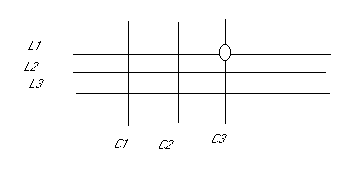
- a touch pad internal directly on the display portion of the screen (of older models is set directly on a standard screen). The keypad consists of a matrix as below which allows to determine the location of the point of button on the screen.
- a controller connected to the matrix that indicates the location of the key point, emulating a left click of a mouse.
- a driver that emulates a click and move a mouse cursor via the information sent by the controller.
The operation is finally simple. When only pressed a point on the screen, it puts in contact a row and a column. Knowing the coordinates of the "click", the controller has only to return information to the software.
For example, pressing the point at the intersection of the lines L1 and columns C3: power, luminous flux,... (depending on the technology) is cut. This determines the exact position where the finger press screen.
Different types of touch monitors are developed with advantages and defaults
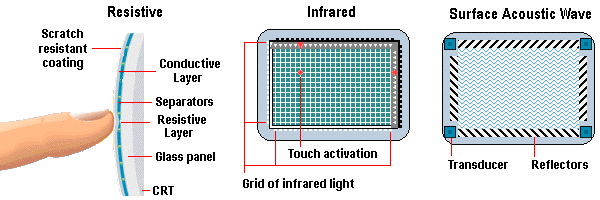
1.1. Resistive touch monitor
Screens touch resistive can be used via a finger or pen. The first layer is a layer of protection, followed by a carpeted conductive layer of a resistive (of wire) matrix. All is directly placed on the screen. This technique is the least expensive. Their main defect is related to the clarity of the image relative to a normal screen. Their big advantage is related to their resistance to wet and chemical conditions. It is the standard technology used in shops and businesses, but also in GSM and tablet. They often also use transflectif technology.
1.2. Infra-red touch monitor
In this case, the grid is not consists of electrical cables, but by beams of infrared light (invisible to the eye). The grid is not really integrated in the screen but simply laid on the screen. A set of light-emitting diode (LED) are used to show on each row and each column. The detection is performed by a group of photoelectric cells each associated individually with a LED. Each provides a voltage in the presence of light. Pressing the screen somewhere, we cut the luminous flux of a line and a column which allows to determine the location.
It has no moving parts, infrared screens are stronger than the resistive with superior clarity. The main shortcoming comes from environment which must not be too bright. This means for small parts, rather dark and reduces the size of the screen.
1.3. Acoustic technology of surface. (Surface Acoustic Wave, SAW)
Highest performing currently, surface acoustic technology uses a similar infrared principle except that a sound signal replaces light. These screens generate different frequencies: one on the left of the screen and one from the upper part with receptors on the other side (bottom and right). It is impossible to fly a sound strictly straight and actually, the signal propagates bouncing around all the edges until the side opposite the touchpad but with a constant propagation time. By pressing the screen, the wave is absorbed and returned more slowly to the associated sound sensor. It is the difference in propagation time which determines the key point. A big difference for these models is that they allow to determine the coordinates X and Y but also the level of drive, they finally 3D models by also determining the part Z, or if the point is little or very depressed.
As the surface of the screen is covered with glass as a standard CRT, they also resist moisture contact. On the other hand, tones cause wetland of various fungi and molds, which reserve them to specific areas of use and applications. Like infrared models, the clarity of the monitor is also high. Precision is also lower.
1.4. Capacitive.
Capacitive touch screens use a glass surface covered with a capacitive grate, which requires the use of a specific pen driver (not the finger). The detection part uses a capacitive connection. Pressing at a given location, it modifies the frequency of an oscillator circuit. It is the difference in frequency that determines the point.
Solid with excellent brightness, these models can be used in virtually all settings and environments.
1.5. Comparison
|
|
Resistive |
Infra-red |
Surface Acoustic Wave |
Capacitive |
|
resolution of touched |
High |
High |
means |
High |
|
clearness |
Means |
good |
good |
good |
|
Operation |
finger or pen |
finger or pen |
Finger or broad pen |
special pen |
|
Resistance |
Can be damaged by pointed objects |
very high |
do not resist water, likely of moulds |
very high |
2. Video projector
The video projectors used to display video sources from different sources on a remote screen by the projector: computers as well as TV, VCR,... In the case of the TV, several standards are used depending on the country: NTSC in North America - Asia, Secam in France and Africa and Pal for the majority of European countries.
Video projectors are characterized by their luminosity expressed in Lumens (also known as ANSI LUMENS). For small rooms and a number restricted Auditors, 1200 lumens is sufficient. On the other hand, for rooms of 600 people with ligght, 2000 Lumens is a minimum. The brightness also determines the maximum distance between the projection screen and projector.
The resolution of a projector complies with the definitions of graphics cards of computer. It is therefore selected by the computer's display resolution and the maximum projector. This occurs only for "computer" views, the definition of a DVD being lower than VGA.
| Normalizes | Horizontal resolution * vertical resolution |
| VGA | 640 * 480 |
| SVGA | 800 * 600 |
| XVGA | 1024 * 768 |
| SXGA | 1280 * 1024 |
| HDTV | 1920 * 1080 |
| HDTV more | 1920 * 1200 |
| QXGA | 2048 * 1536 |
Video projectors integrate generally several both computer video input connectors. Some projectors allow the use of a laser mouse that replace the mouse directly on the projection screen.
Speakers are sometimes added back into the housing. They are insufficient for normal presentations.
Some projectors allow to invert the image. This allows to hang the projector on the ceiling upside down. Found in the market of the TV-Hifi of LCDs (or same plasma screen) of the same type as the screens.
There are three technology: LCD, CRT and DMD.
2.1. Technology LCD (Liquid Crytal Display)
LCD projectors are the most common and more transportable with a weight about 3 Kg. Their brightness is sufficient for the majority of presentations and home theater. Other side of the coin, the lamp is relatively expensive and fragile (typical life of 2000 hours, from 1500 to 4000 hours duration). The beam of light generated by the lamp passes through a formed Panel of a multitude of points (liquid crystals). The orientation of each Crystal is determined by an electric field. Depending on the orientation, the light will be more or less important on the screen according to the three basic colors. The maximum resolution is determined by the number of these crystals.
Tri - LCD technology is a derivative. Videos-headlamps using this technology uses not 1 but 3 light panels. The image quality is significantly improved with higher resolutions.
In both cases, the precision of the image degrades with distance. This explains that each projector has a maximum display size. A manual setting is provided on the objective.
2.2. The projectors videos Tritube.
 This technology made famous by the BARCO firm uses a technique similar to that of the TV. Although the brighter with true contrasts (black is actually black), this technology is little used in computer projectors. It allows the greatest displays (up to 10
meters long) with lamps of a lifetime of 10,000 hours. Unlike other technologies, the lamp does not slap but wears. The disadvantages, however, are many: delicate setting (practically requires a technician to each change of place of the projector), congestion, lens fixed (no
zoom)
This technology made famous by the BARCO firm uses a technique similar to that of the TV. Although the brighter with true contrasts (black is actually black), this technology is little used in computer projectors. It allows the greatest displays (up to 10
meters long) with lamps of a lifetime of 10,000 hours. Unlike other technologies, the lamp does not slap but wears. The disadvantages, however, are many: delicate setting (practically requires a technician to each change of place of the projector), congestion, lens fixed (no
zoom)
As the tritubes allows the projection in the darkness, they are reserved for the real cinema, especially considering their price.
2.3. Projectors DMD (DIGITAL Micro mirror Device) or DLP (DIGITAL Processing Light)
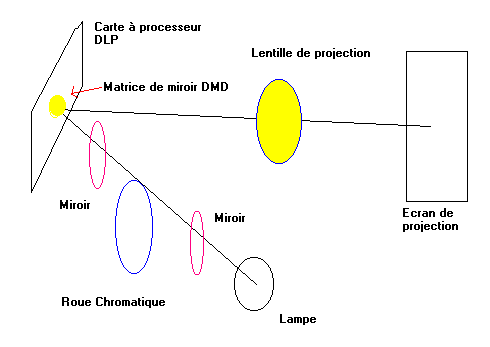
Invented by Texas instruments, DLP technology is based on a matrix of mirrors called DMD. It is similar to that of the LCD, except that liquid crystals are replaced by small mirrors controlled by transistors. Mirror switch on their axis to determine which light is projected along an axis of + 10 °
 A DMD chip is approximately 2 cm 2 and contains between 500,000 and 1,300,000 digital
micro-mirror device.
A DMD chip is approximately 2 cm 2 and contains between 500,000 and 1,300,000 digital
micro-mirror device.
The luminosity is greater than that of the LCD with an excellent (although less than that of the tube) contrast ratio.
This technology integrates both home theater and video computer projection and replace term LCD technology. Nevertheless, as for the projectors LCD, the lifetime of the lamp (and its price) makes hardly usable for intensive use.
The light is projected by the lamp on an optical correction. It then passes through a color wheel (color separation) which is again corrected by a control perspective. DMD system controlled by the processor DLP card will then transmit (or not) the screen via a projection lens.
The color wheel to some side effects on the image including a small effect of flicker.
In relation:
- Course: Color Parameters Resolutions, colors...
- Video Card Course: Operation, type, bus, ...
- Training: CRT and TFT Technologies of the standard monitors
|
The continuation of the course Hardware 2 training > Chapter 17: ADSL by router - firewall hardware |

The course "Hardware 2" course: Network, servers and communication.