
13. Exercise: structure of a corporate network
13.1. The exercise - 13.2. Global architecture of the network - 13.3. Connections of the network administration - commercial - 13.4. Connections building manufacture - order - 13.5. Global connection of network
See a concrete case of the architecture of a network (devices to implement) installation in a company. This chapter brings together virtually all of course hardware 2, except the setup of the network devices.
Like exercise, 2 buildings to connect 80 meters apart (no chance, a road in the Middle so a wireless wifi or possibly a CPL). Each building has two floors with 2 different departments (4 departments). I want high levels of security (hardware) to ensure that each PC a Department cannot (unless authorization by workstation) to connect to another Department. In hardware, only two solutions are therefore usable, the router - firewall and the manageable switches. This protection will be in practice coupled with software protections which are included in other courses 'Technician PC / network' as the course Windows.
This gathers practically the whole of the course hardware 2, except the network equipment parameter setting. Chapter 17 had been used as examination for the year 2001-2002.
Exercise
The departments are:
Building 1 (production): 80 PC dedicated manufacturing (no INTERNET access) and 1 server with dedicated software. Maximum distance with the server 100 meters. This Department brings together the production, stocks, transportation management... It is the Department to protect. A plant of 1 hour stop costs significantly more expensive to the company than a judgment of 2 days of accounting.
Building 1 (order management): 10 computers and 1 dedicated server. Some of them may have access to the Server service of manufacturing on a radius of 30 meters. No INTERNET access, no to building 2. We will call this command Department
Building 2 (administration): 10 PC for direction, accounting
Building 2 (sales): 10 PC for commercial and various services on a radius of 30 meters.
The 2 building houses a small file server (documents Word, Excel,...) and an application server (accounting), called administrative server.
Some PCs can access the "command management" server. Building 2 (administrative and commercial) must have secure access on the INTERNET via an ADSL line. It must be possible for the business to connect to the server of the company remotely via INTERNET.
Give to the plant diagram with servers, used hubs (hub, switch, router, number of ports), types of links, or crossover cables,... In case you use a HUB or switch, explain. I do not ask explicitly the brand and the apparatus for each hub.
A switch to 80 ports, is not common, manageable? The installation of the network must be complete, consider the safety devices to be installed (electrical protections, backup) and types of servers used. I don't mean a security via passwords, but by TCP/IP settings or computer materials: it is much safer. As the hardware network may crash, hardware must be standardized (for example the switch) so we could use a minimum of reserve equipment: maximum of hubs of the same type and capacity across the network to use a replacement unit for the entire company. I do not ask the settings of devices, just the structure of the Ethernet network.
Don't mind too much of the budget, but choose the characteristics in computer Manager (not worth to use the Gigabit Ethernet over optical fiber to connect stations).
2. Global architecture.
To facilitate the installation of the architecture of our network, let us examine the equipments to be implemented. We will use the following drawings to facilitate the analysis of the total diagram of the network.
|
|
|
|
|
Server |
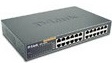
Switch or Hub Ethernet (here a DES-1024d of Dlink 24 ports 10/100) |
a simple router |
 |
|
|
|
Router Wifi, usable like router and bridge. |
A Cable RJ 45 Cross |
modem router ADSL, here a tornado Copperjet 812. It can be used like simple modem in bridge mode |
|
|
|
|
|
Router firewall integrated allows of protected connections by blocking certain TCP and UDP ports and/or certain beaches of addresses. |
A department with the associated PC |
NAS for file sharing |
|
|
|
|
|
UPS: electric protection |
Backup on tape |
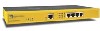
A firewall - VPN (here a series 100 of Symantec) gives the division of the connection Internet and access of outside to the corporate network |
|
|
||
|
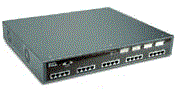
Switch manageable: to authorize (or block) certain connection of PC towards PC (or rather of groups of PC), in more of the passwords sessions users managed by the operating system Here a DGS 3224, 20 ports 10/100 and 2 gigabit ports base of them T (copper) of Dlink |
||





Analyze the problem according to the different parts and senses of communication allowed. This will split the problem and consider wholesale appliances for use at connection, routing and security level.
The administration departments and commercial are not very different. They both use: INTERNET (these are the only ones), the same servers (a file server and a small application server). On the other hand, a computer of the administration must be able to connect on the command Department (but not the manufacturing department), the sales department can only connect on the command and manufacturing departments. INTERNET access to the servers of building 2 (administrative and commercial) requires us to use a VPN firewall for INTERNET (here a symantec 100 series) and a used (here a tornado 812). ADSL modem in bridge With 20 PC in building 2, there is no need of something very powerful, but sufficiently secure. As external access is possible, the connection must be fixed IP-type.
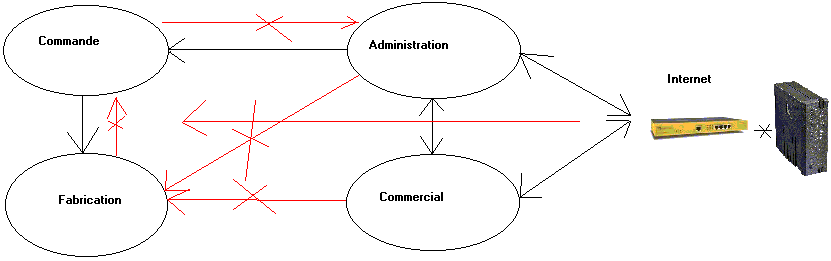
Arrow black, communications allowed (even with blockages), in red those that need blocking. It gives a good idea of the overall structure of the installation. The road between the two buildings will block us with a binding on copper or optical fiber. Already, we will have to use a binding without wires, type WIFI 802.11 G 54 Mbps or a Powerline network (much better than the security level but not always possible depending on the phases of the electric network).
13.3. Connection administrative and commercial department
overall structure of the installation. The road between the two buildings will block us with a binding on copper or optical fiber. Already, we will have to use a binding without wires, type WIFI 802.11 G 54 Mbps or a secure Powerline network (much better than the security level but not always possible depending on the phases of the electric network).
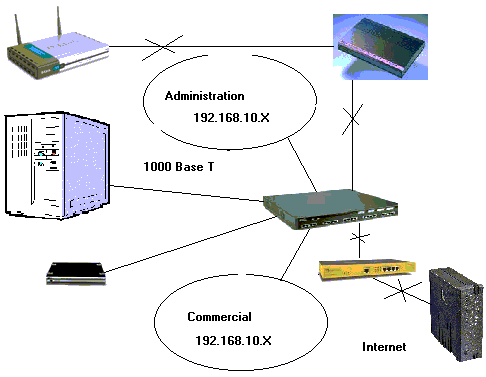
The departments use an application server and a small file server. As file server, to reduce costs, use an external hard drive connected by Ethernet (NAS). As we must connect 20 PC + 1 Server + NAS + 1 connection building 1, unit 1 represent (20 + 2 Giga ports) is not enough but we could use a switch 8 additional ports. The NAS are rarely in 1000 Base T.
For the connection to the second building we use wireless connection. As building 2 may have the connection to the control Department (not to the manufacture) we will use different addresses for building 1 classes. This requires the use of a router. As the connection must be secured (blocked from building 1 to 2) over the prohibition of connection INTERNET to building 2, use a router firewall and router 802 .11b in bridge. In this case, the firewall will not be used to block ports: in an internal network, the dynamic ports (1024-65535) are used randomly for communications internal networks, we cannot block them. We will only block the communications on the address ranges. For example to block communications from the IP address of the VPN to building 2.Another solution to lock "Manufacture" - "administrative" would be to secure the wireless network based on the mac address of the PC of the administration Department, or even network security wireless in the topic How to?
13.4. Connection Building manufacture - order
The factory to command communications are prohibited. Only communications orders to factories are authorized (with some reservations). We have again two possibilities of using classes of IP addresses. Either two different classes with the use of router, or the same address class with a manageable switch (at choice).
Case 1: use of 2 classes of different addresses.
The use of a router (and thus address 2 classes) will increase security. The use of a router with firewall is not required since two-way communication requires two routers while we use communication only command to manufacture. This already prevents the plant to connect to the control Department. Security from the Internet is already provided for recall with the VPN, and firewall placed at the output of the administrative building to the WIFI router. Similarly, for the 1 to building communications building 2, we can either use a WIFI router in Bridge mode and a firewall (case below), or a WIFI router firewall. The security is anyway provided by the firewall on the other side the wireless connection..
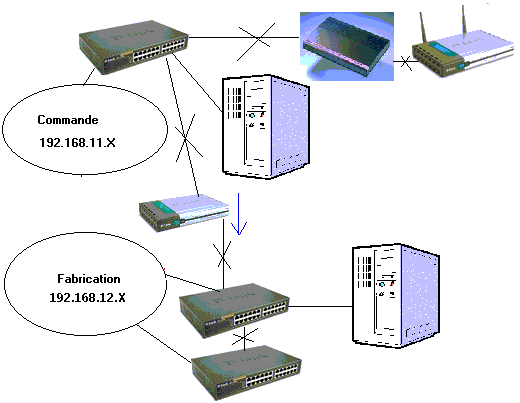
The number of switch 24 ports for part manufacturing has voluntarily reduced for clarity of the diagram. Need us minimum 4, or even 5 to have reservations lines. The use of a single 96-port switch could cause problems of length cables and this single device failure, all manufacturing would be blocked. The use of multiple switch 24 ports can have 1 reserve for the whole of the building. The production server must be connected to the first switch to the manufacture.
The use of a firewall between the switch and the Wi-Fi 802 .11b router is not necessary if a firewall is installed on the other side. They would double employment (which is not too serious) but would require a more complex configuration of the infrastructure.
Case 2: use of the same class of address with switch manageable.
In this case, all the PC are in the same class of address, the use of a router (or router - firewall) is not more necessary between the two departments, it is the switch manageable which will accept or block the communications. In this case (and contrary with the preceding solution), one can block the communications in manner hardware between the PC of the orders and the PC of manufacture).
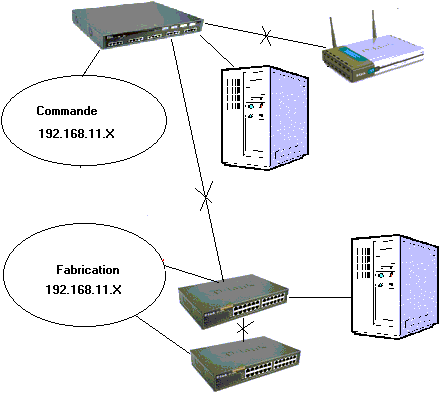
This solution is much more expensive (but more secure). She nevertheless to connect servers in 1000 base T on the manageable switch. The distances between each PC, servers and hubs are met since that 100 base T 1000 Base-T, the maximum distance is 100 meters.
13.5. Total connections of the network
It only remains to connect the two networks of the company and position our safeties (UPS and backup) and select servers.
The servers used for building 2 and orders are in fact small servers. On the other hand, the server used in manufacturing is a muscular (with dedicated software) application server type dual. For reasons of data security, we use SCSI RAID 1 or better RAID 5 servers. More processor is big more it consumes. The UPS (of On-Line type of preference) must report. As a reminder, the output of the power consumed by the server X 1.6 = UPS. So for a server consuming 800 W (including display), the output of the UPS is 800 X 1, 6 = 1280 W.For the backup of data, we will use strips of type DAT or Super DLT for the capabilities of these technologies, but also the backup rate level.
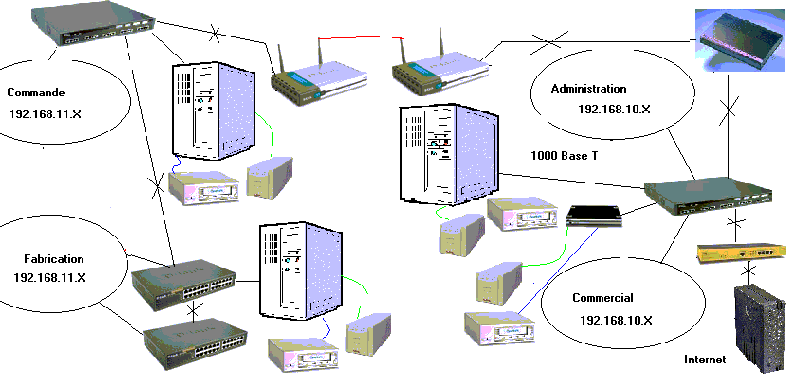
We could still add on the diagrams of the small UPS for certain stations or concentrators, according to desideratas' of the company.
13.6. Errors and remarks of the examination
After correction, I takes again the errors of the architecture of the network. Some remarks and errors of the examination are taken again here.
- Network building 2: 2 different addresses classes of IP for administrative and commercial connected both on the wearing of entry of the VPN (correct connection Internet) but not from router enters both. In this fact, no interconnection between the 2 groups of more serious computers but, 1 only department out of the 2 will have access to the server and the NAS. In short, the network infrastructure building 2 does not function.
- 2 classes of different addresses for order and manufacture. The PC orders connected on a router 16 port (am not sure that that exists) and connected on a HUB 8 port which is connected on 5 hub 24 ports for manufacture. As the Fabrication server is a dedicated application, it is supposed that the PC will not be connected between them but all worms the server in their turn with some problems of collisions (the server will answer each one in its turn, which can be correct). On the other hand, the use of Hub like head of bridge between the router orders and the various HUB manufacture directly will slow down the whole of the network.
- Use of 2 firewall (1 on each side of wireless bridge), configuration of the architecture of the more complex network.
In relation:
- Ethernet network Standards of the Ethernet networks
- Course: UPS Technology of inverters and UPS
- Base microprocessor Electronic course
- Wireless Network Communications without wire, standards, speeds...
|
Next of the Hardware 2 course > Chapter 14: Specific technologies networks |

For the whole of the hardware training
The Hardware 1 course: PC and peripherals, the hardware 2 course: Network, servers and communication.
© YBET data processing 2005 - 2015